 DoubleEntry
Guide · 5
Reading the reports
Because every transaction balances, DoubleEntry can give you the same reports a company's accountant produces. Each one answers a different question.
| Report | Answers | Covers |
|---|---|---|
| Balance sheet | What do I own, what do I owe, and what am I worth? | A single date |
| Net worth | Am I getting richer, month after month? | Several months |
| Income | What did I earn and spend, and how much did I keep? | A period |
| Cash flow | How much money came in and went out of my accounts? | A period |
| Cost trends | Where does the money go, month after month? | Several months |
Choosing the period
The income statement and cash flow share the same controls:
- Month, YTD (year to date: January up to the selected month) or Year.
- The arrows, or a tap on the label, select which month or year.
- No comparison, Previous period or Same period last year add the change next to every figure, in amount and percent.
- For a single month, 12-month average compares it with an average month: the twelve months before it, or as many as your ledger has. Was September expensive, or just normal?
The examples below are from the demo household's September 2026, compared with August.
Balance sheet
The balance sheet is a snapshot of your finances on one day. Pick the date with Today, End of last month or End of last year, or tap the date to choose another.
The three tiles at the top are the accounting equation in numbers:
- Assets: everything you own, grouped as belongings, cash and bank, investments, retirement savings and so on. Tap a group to see its accounts.
- Liabilities: everything you owe, such as loans and credit cards.
- Equity: your net worth. It's your opening balance plus retained earnings, everything you've earned minus everything you've spent since, split into previous years and this year.
The green label Balanced: assets = liabilities + equity confirms the books add up. If it ever says Out of balance, look for an incomplete transaction.
Accounts with a zero balance are hidden. Turn on Show empty accounts to see them.
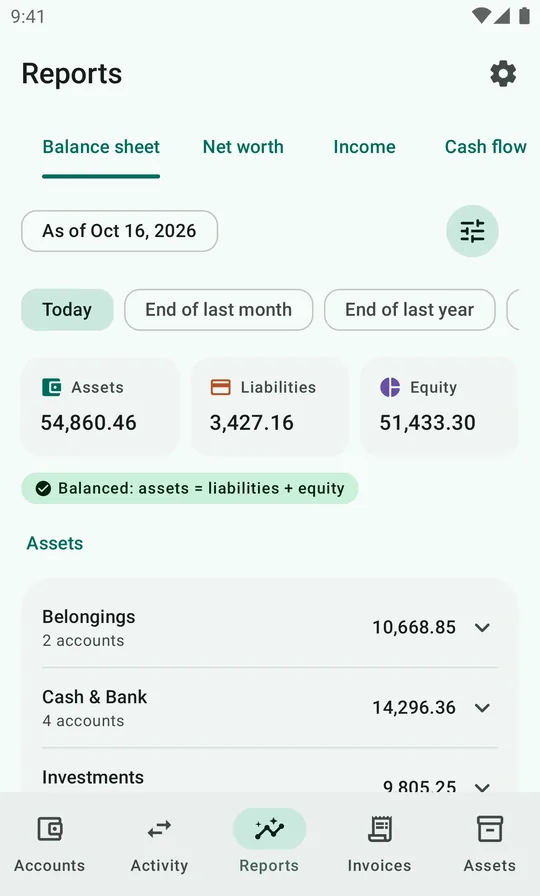
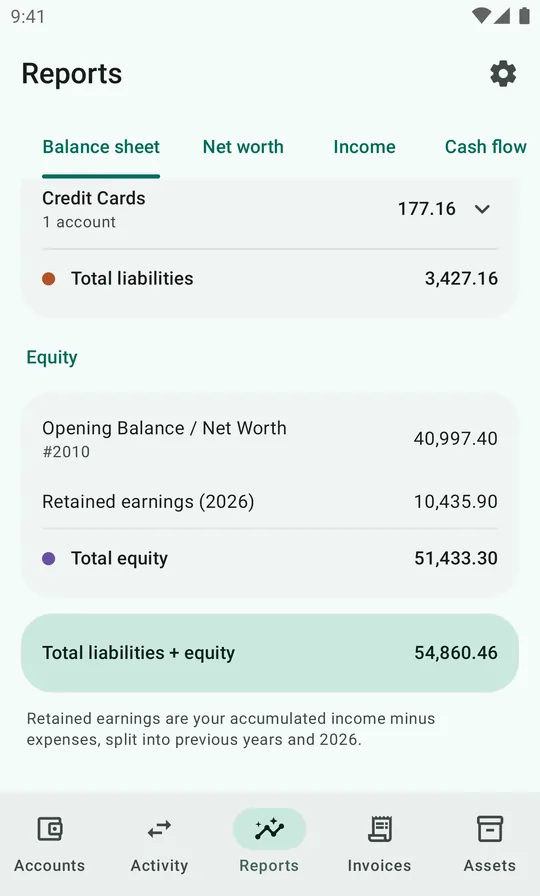
How to read it: the demo household started the year with a net worth of 40,997.40 and has added 10,435.90 so far in 2026. Of the 54,860.46 in assets, 20,090.00 is pension savings they can't touch yet, and 14,296.36 is cash and bank they can.
Net worth
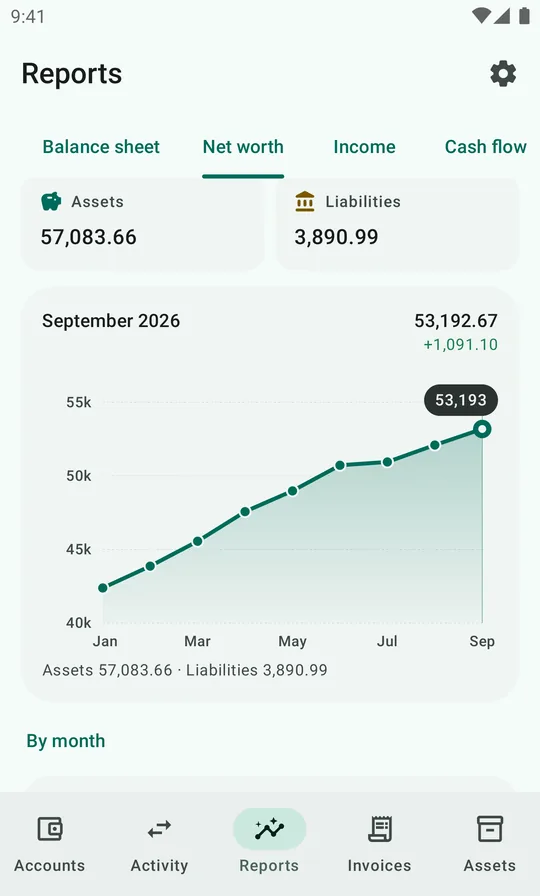
The balance sheet is one day. The Net worth tab shows how you got there: your net worth at the end of every month, as a chart and as a list.
- Choose 1 year, 3 years, All or a Custom range, and the last month with the arrows.
- The top card shows net worth at the end of that month and how much it changed over the range, with your assets and liabilities below it.
- Tap the chart to read a single month: its net worth, the change from the month before, and the split between assets and liabilities.
- By month lists every month, newest first, with its change.
On the Accounts tab, Trend on the net worth card opens this report at the month you were looking at. The demo household went from 42,379.87 at the end of January to 53,192.67 at the end of September. It grew every month, though only a little in July.
Income statement
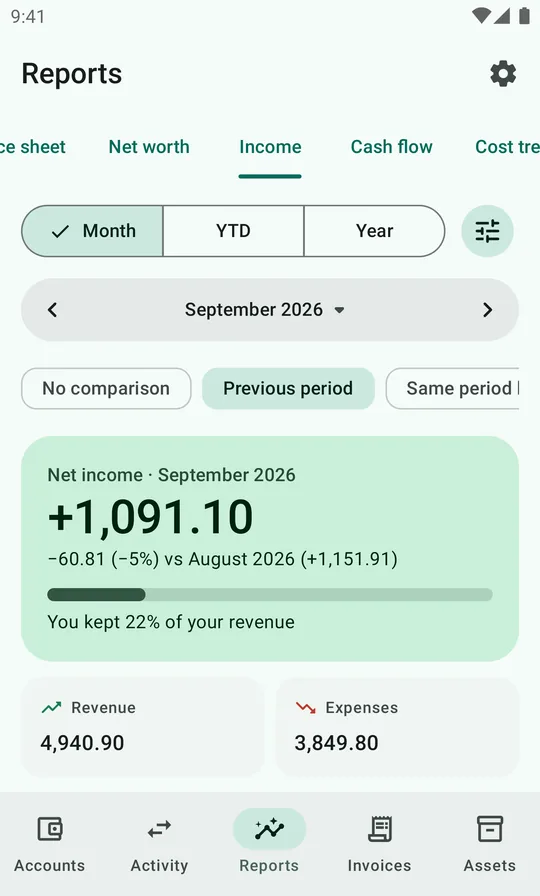
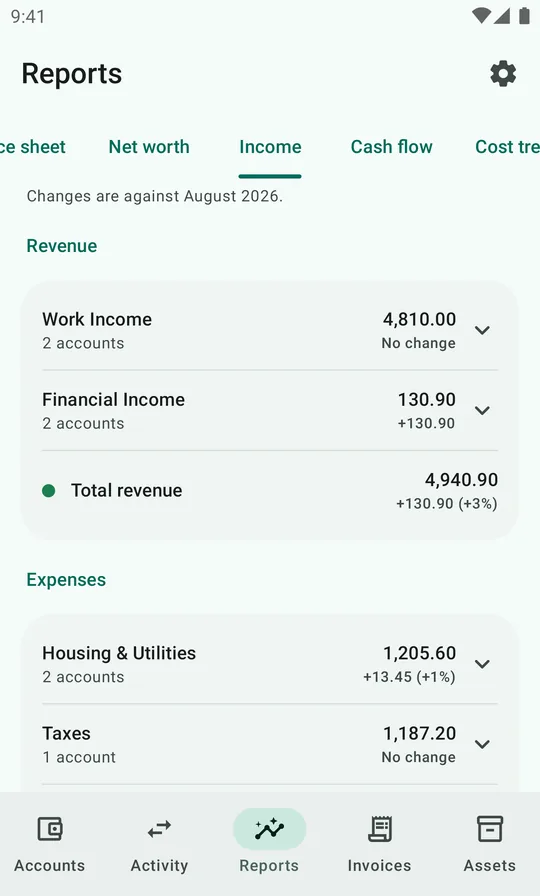
The income statement shows what you earned and spent during the period. The top card shows the result, net income, and how much of your revenue you kept. In September the household earned 4,940.90, spent 3,849.80 and kept 1,091.10, or 22%.
Below that, Revenue and Expenses are listed by group, such as Work Income, Housing & Utilities and Food & Household. Tap a group to see its accounts. With a comparison selected, each line shows the change: here, Food & Household was 236.33 lower than in August, while Transport was 174.59 higher, mostly because of a new set of winter tires.
From revenue to net income
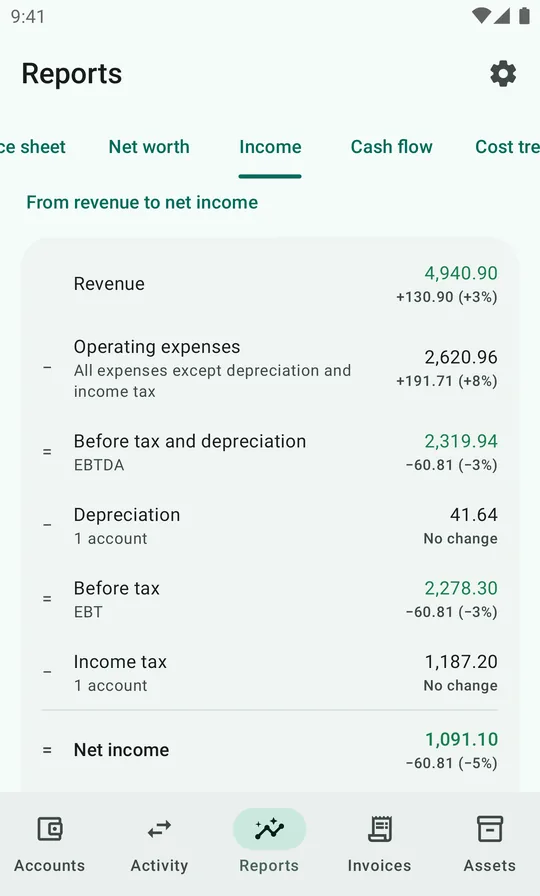
At the bottom, From revenue to net income shows how the result adds up, one step at a time: start with revenue, take away one kind of expense, and see the subtotal. The subtotals carry the names company accounts use, but each one answers a useful personal question:
| Step | What it is | Sep 2026 |
|---|---|---|
| Revenue | Everything you earned | 4,940.90 |
| − Operating expenses | All expenses except depreciation and income tax: the everyday cost of living | 2,620.96 |
| = Before tax and depreciation (EBTDA) | What your income left after the cost of living | 2,319.94 |
| − Depreciation | The value your things lost this month | 41.64 |
| = Before tax (EBT) | Earnings before tax | 2,278.30 |
| − Income tax | Tax withheld or paid | 1,187.20 |
| = Net income | Revenue minus all expenses | 1,091.10 |
| − Routed to deferred assets | Income paid straight into savings you can't spend, like an employer's pension contribution | 210.00 |
| = Spendable net income | What you actually had left over | 881.10 |
Tap Depreciation or Income tax to see the accounts behind them. With a comparison selected, every step shows its change too.
What they tell you: Before tax and depreciation is what your income left after the cost of living. A good figure to compare across years, or with friends, since tax rules vary. Depreciation isn't money leaving your account, but it is real: the laptop loses 41.64 of value every month. Spendable net income is the honest answer to "how much did I actually have left over this month?". The pension contribution is income, but you can't spend it.
The steps follow your report settings: without accounts marked as tax or depreciation, the breakdown is simply revenue minus expenses.
Cash flow
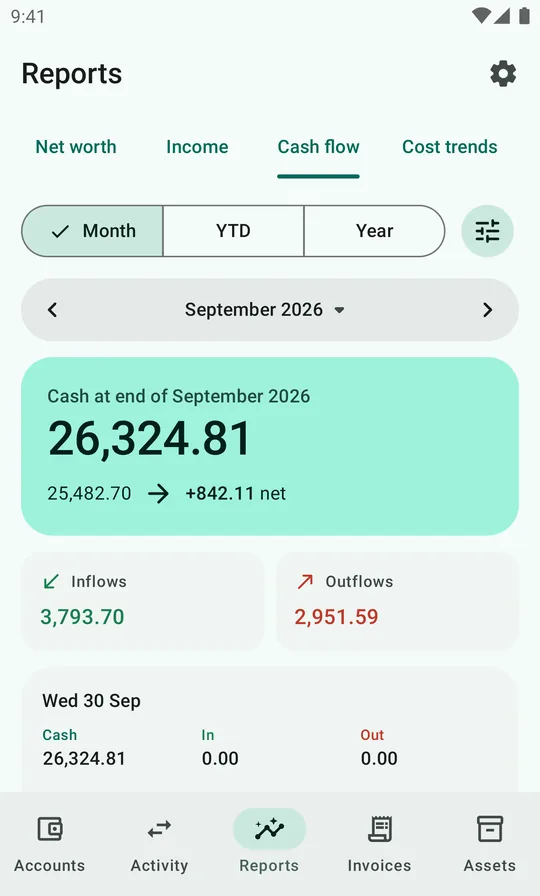
The income statement says whether you earned more than you spent. The cash flow says what happened to your money: how much cash you had at the start and end of the period, and what flowed in and out.
They differ for good reasons. The laptop's depreciation is a cost but not a payment. Paying off a loan is a payment but not a cost. The pension contribution is income that never reaches your bank.
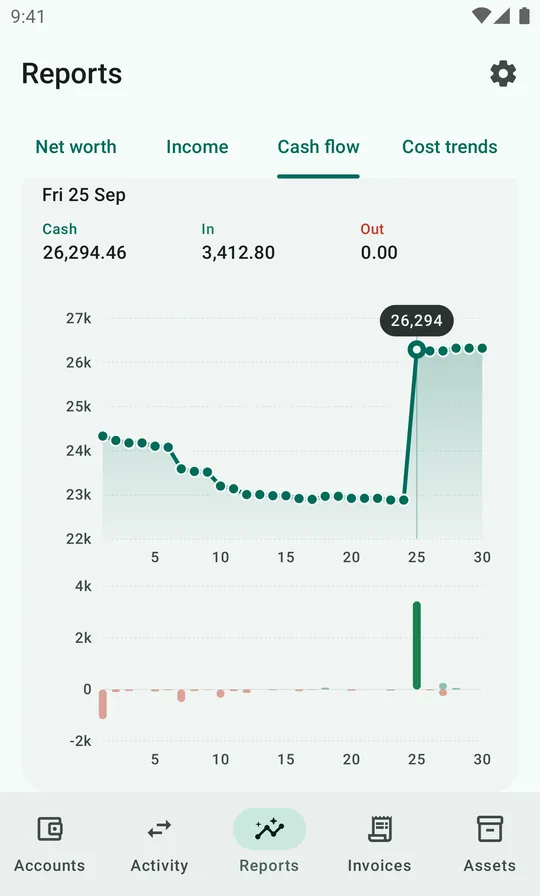
Below the totals, a timeline charts your cash balance over the period, with each day's inflows and outflows as bars underneath. Tap a day to see its balance and what came in and went out. In September the cash drifts down all month, then jumps on the 25th, payday, when 3,412.80 comes in. Periods longer than two months are charted by month instead of by day.
Your cash is split into cash groups, by default Cash & Bank and Investments. Tap a group to see each account's opening balance, inflow and outflow.
Transfers between accounts in the same group cancel out: moving 400.00 from checking to savings isn't a flow. Moving money between groups is: in September, the 250.00 monthly investment shows as an outflow from Cash & Bank and an inflow to Investments, next to a 69.10 dividend.
Which accounts count as cash is set under Settings → Reports → Cash flow.
Cost trends
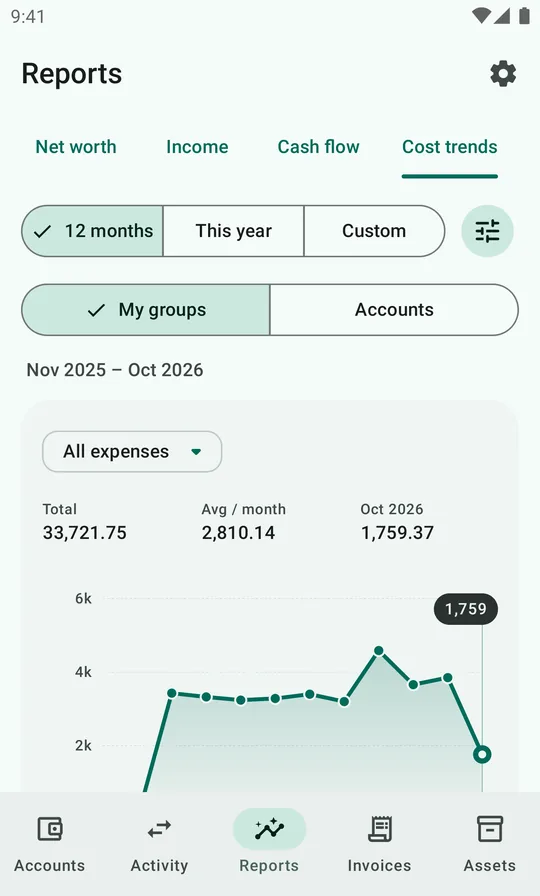
Cost trends chart your expenses month by month. Choose 12 months, This year or a Custom range, and whether to look at My groups or individual Accounts. The menu above the chart narrows it to one group or account, rent alone or just restaurants, or switches the total to All expenses excl. tax or Cash operating expenses (without tax and depreciation), so a big tax month doesn't hide what you spent.
Above the chart: the total for the range, the average per month, and the selected month. Tap the chart to read the value of a single month.
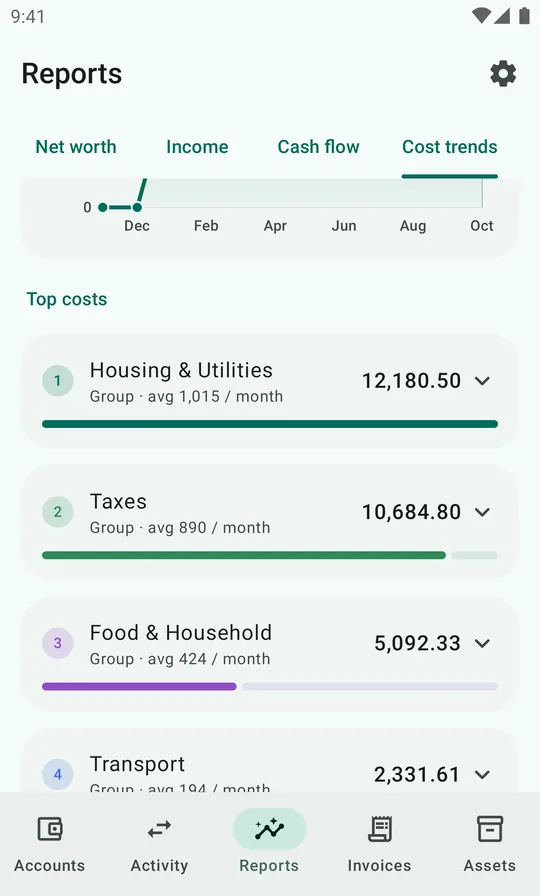
Below it, Top costs ranks groups or accounts by total, with their monthly average. The demo household's biggest costs are housing at about 1,015 a month, then taxes, then food.
Cost trends use the same groups as the income statement.
Report settings
Every report group is a name and a list of account-number prefixes. Cash & Bank is accounts starting with 191, 193 or 194. Food & Household is accounts starting with 61. Accounts that don't fit any group are shown as Other.
To regroup, open Settings → Reports:
- Balance sheet: asset and liability groups.
- Income statement & cost trends: revenue and expense groups, plus which prefixes are depreciation, which are taxes, and which assets are deferred (savings you can't spend), used for the steps from revenue to net income and the totals in cost trends.
- Cash flow: which accounts count as cash, in which groups.
The default personal plan comes with groups that match its numbering, so you only need these settings if you build your own chart of accounts or want a different breakdown.